TL;DR: The visited_links table provides information about how a user gets to a specific site. It may also contain records even if a user clears their history (prior to July 22nd 2024) but only if they selected the “All Time” range for deleting history. It also appears that any records that were not deleted are kept when the Chrome Browser is updated.
In Detail
Recently came across a new table in the Chrome History Database named “visited_links”. This came about from a case where relevant Internet history was located within this table and no references to this Internet activity had been located in any of the usual forensic tools (UFED, Axiom, ALEAPP) and only came around when running hex level keyword searches in X-Ways.
A quick search for information relating to this table doesn’t bring much up though there is some useful documentation.
The Chromium documentation here gives a bit of information and links to this page which seems to imply that this change was a way of stopping attackers remotely identifying Internet history based off previously visited links.
The Chromium source here gives some further information on the record structure.

Takeaways from this documentation:
- The link_url_id should match the corresponding website in the Urls table
- top_level_url appears to be the top level URL that link was visited from
- frame_url appears to be the actual URL the link was visited from
Given the lack of documentation anywhere else, or from other practitioners, a test was going to be the only way that this activity could be confirmed
Test Setup
As with all tests of this nature, I strongly recommend the use of a Virtual Machine to encapsulate all of the data and prevent any interference from other software. Its the closest we can get to a sterile environment. For this lot of testing, I created a Windows 10 VM the using Gnome Boxes 42.2-stable, with the Spice guest tools installed from here
The Google Chrome browser (version 130.0.6723.117) was installed as the virtual machine and a copy of the History database (located in C:\Users\%username%\AppData\Local\Google\Chrome\User Data\Default) was made and reviewed prior to any Internet activity.
After this copy of the database had been made, a number of websites were visited and links accessed in different manners including typed URLs, followed links and opening links in a new tab using the middle mouse button. Table of activity is shown below:
| Activity | Related Website |
| Typed URL | https://www.google.com/ |
| Ran a Google search for “Turnip” | |
| Clicked link from search results to Wikipedia | https://en.wikipedia.org/wiki/Turnip |
| Clicked link to “Root Vegetable” from within Wikipedia Article | https://en.wikipedia.org/wiki/Root_vegetable |
| Went back to Google Search using browser button | |
| Middle clicked “Turnip – Good Food” – | https://www.bbcgoodfood.com/glossary/turnip-glossary |
| Clicked BBC Turnip Recipes from Google search result | https://www.bbc.co.uk/food/turnip |
After the activity had been undertaken, the Chrome browser was shut down and a copy of the database was made again.
Following this, Chrome was re-opened and set to remove all history from the device, using the standard settings as shown below
Test Results
Initially, “the visited_links” table was empty, along with most of the other tables in the database.
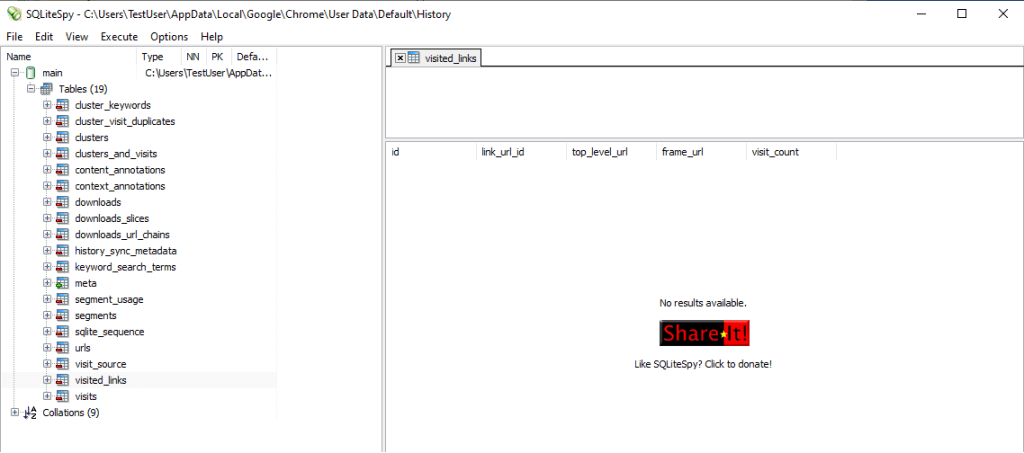
After the activity, we can see the following data in the “visited_links” table:

And the details in the “urls” table is showing as:

Using a simple SQL statement we can join these two tables together to make reviewing the results easier
select v.id, u.url, v.top_level_url, v.frame_url from visited_links as v
left join urls as u on v.link_url_id = u.id 
Testing older versions
There is information available on the Internet that shows that, at some point, the deletion of these records did not work as it should. The patch information is shown here and shows that the fix for the issue was resolved July 22nd of 2024. There is also a post relating to the Brave browser of user’s reporting that the table did not clear when clearing history. The Brave browser is based on Chromium and the post seems to suggest it is a Chromium issue rather than the Brave browser.
In order to confirm this behaviour, the testing was re-ran on an older version of the Chrome Browser.
Testing an older version of Chrome comes with some additional challenges as it automatically updates to the latest version. In order to re-do the testing on an older version, I had to do the following:
- Download and older version of Chrome
- Disable Chrome updates
- Re-Run tests
Downloading an older version of Chrome is not the easiest process, especially if you want a very specific version. There are a few websites that store older version including:
https://filehippo.com/download_google-chrome/history/
https://www.slimjet.com/chrome/google-chrome-old-version.php
These versions were too old for testing purposes (pre visited_links table being present). The version mentioned in the Brave browser post was version 126 and the newest versions on these sites were 104. I ended up downloading version 127 from:
https://www.filepuma.com/download/google_chrome_64bit_126.0.6478.62-39547/
Lastly, the details on how to disable Chrome from auto-updating is documented here:
https://www.makeuseof.com/tag/stop-automatic-chrome-updates-windows/
The results of the first tests were identical, the links were created in the “visited_links” table as expected. In relation to history deletion, the manner in which history was deleted made a difference. The default option selected for history deletion is the last hour as shown below.
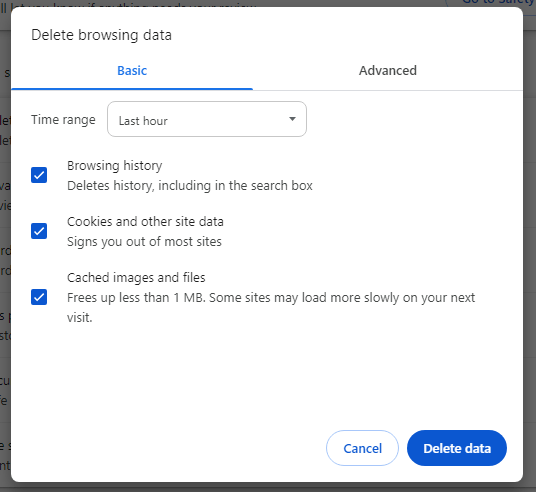
When history was deleted in this manner, the “visited_links” table was also deleted. However if this was changed to “All Time” then data remained in the “visited_links” table. The clue to this was in the Chromium documentation that referenced the “DeleteAllHistory()” function and states:
Now, if a user visits chrome://settings/clearBrowserData and selects the deletion period as “for all time”, it should delete :visited-ness correctly.
After confirming these records were not deleted, I upgraded Chrome to version 127 and then to the most recent version (130) and the records remained in the history.
When conducting further browsing, after the deletion of all the history, the url id’s referenced in the “visited_links” table were re-used. This meant linking the records in this table to the urls table produced erroneous results, although the urls in the “visited_links” table were still correct.
 AskClees
Hello, thank you for the information. I’m currently investigating an issue where one url was shown in “visited_links” but not in “urls” table. Did you ever find out why that might be happening? The frame_url was http://www.msn.com, and the ID was pointing to msn’s weather page in “urls” table.
LikeLike
It looks like that would be a similar case to the above scenario, the url id’s are being reused and therefore point to an unrelated url entry
LikeLike